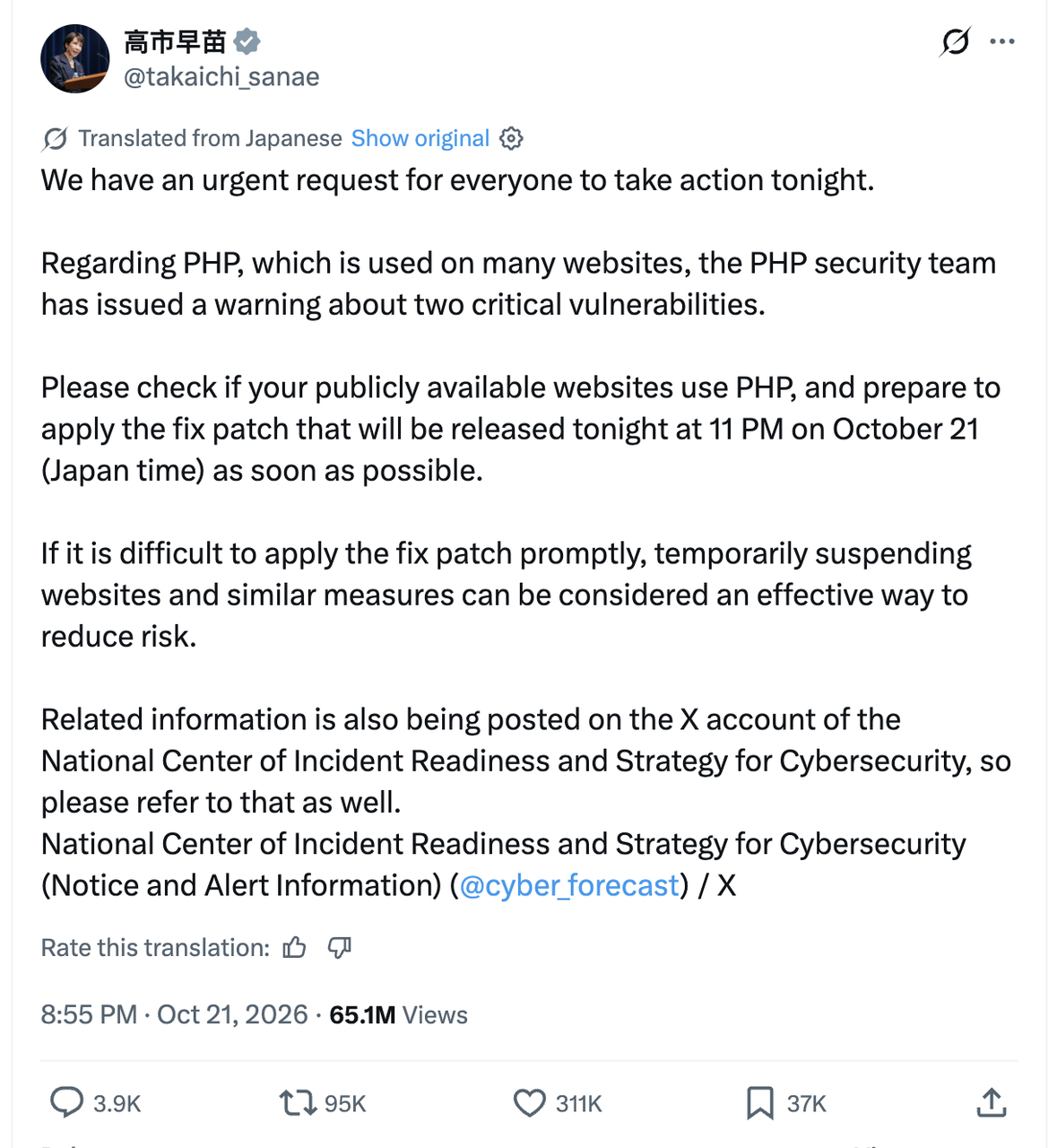
Yesterday PHP disclosed two critical remote code execution (RCE) vulnerabilities, tracked as CVE-2026-109618 and CVE-2026-109619, with a CVSS score of 9.2. According to the official advance notice and a bulletin from the EU Computer Emergency Response Team (CERT-EU), the patch window was set for 22:00 Beijing time on October 21.
The news set off a wide discussion across the developer community—and even reached Japan's Prime Minister Sanae Takaichi (name another language runtime that gets a shout-out from a head of government. PHP really took that W).
In the hundreds of comments on the Hacker News hot thread, engineering teams kept circling two themes. First, distro builds, verification, and package distribution always leave a time gap before patches land everywhere. Second, a huge number of still-running older PHP projects have no upstream official patch support—and jumping across major versions carries steep code-migration and extension-compatibility risk.
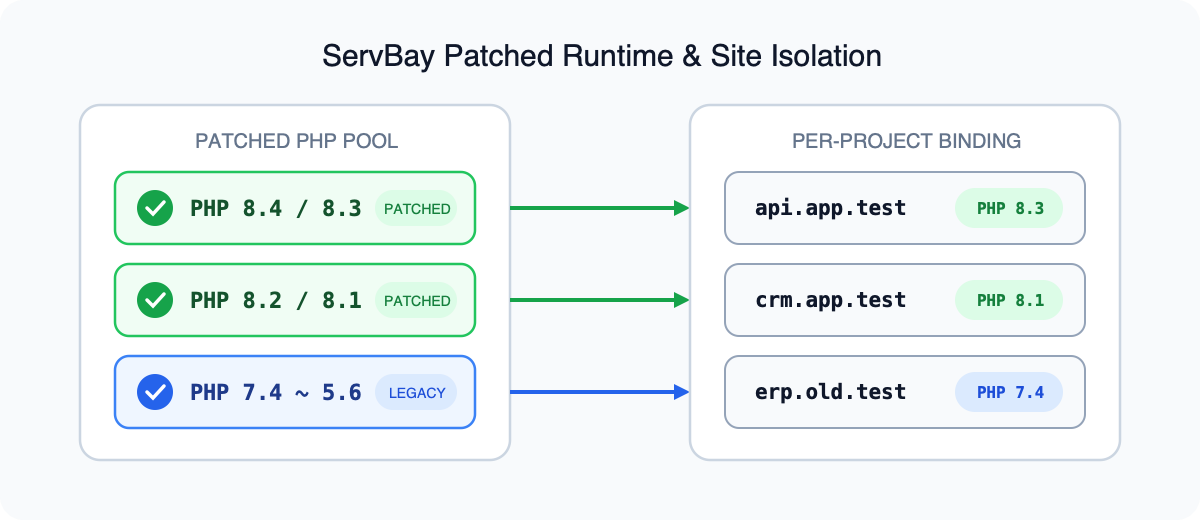
ServBay has already shipped security updates for this PHP incident, and has also released patch support for older PHP versions. For developers maintaining multi-version projects or legacy systems, patched builds are available—so the hard part is no longer finding a fix. The critical next move is confirming that the updated binaries are actually what every target site is running.
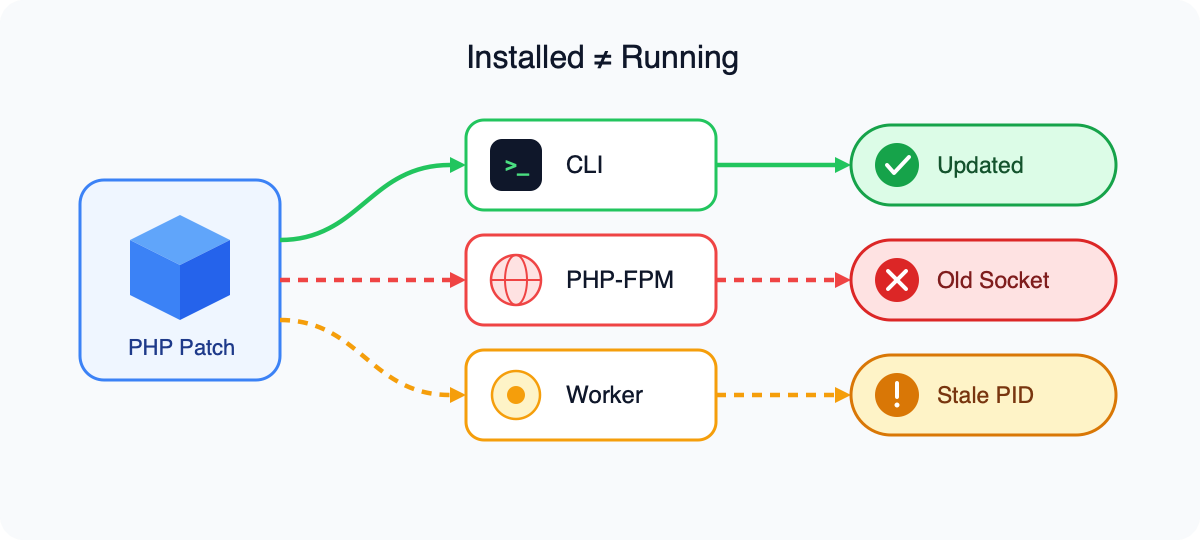
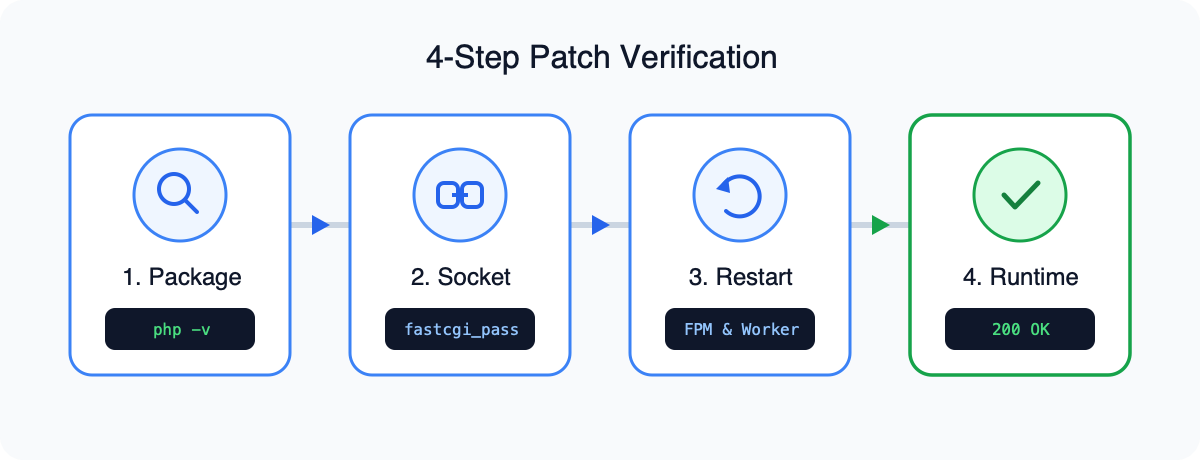
When a PHP security patch lands, seeing an upgrade command succeed in the terminal does not mean your live sites and background jobs are out of danger. On a single server or developer machine with multiple PHP versions, the command line (CLI), the Web request path (PHP-FPM), and long-lived queue workers each load their own binaries and configs. Only by walking the four gates—package installed → site selected → process switched → regression passed—and keeping runtime evidence at each step can you prove the new patch truly owns production traffic.
Why Installed ≠ Running
Many developers lean on AI coding assistants to generate upgrade commands. After the package upgrade finishes and the terminal prints a fresh version string, it is easy to assume the fix is done. In multi-version environments, that assumption is a classic way to leave holes open.
On any one machine, PHP usually has at least three independent execution paths.
Terminal / CLI entry point
When a developer types php -v in an SSH session or local terminal, the OS resolves the executable from the current user's PATH. After a package update, the default symlink may point at the new build—but that only changes behavior for the current CLI session. It has no direct link to the processes that serve HTTP traffic.
Web server FastCGI entry point (PHP-FPM)
When Nginx or Apache handle dynamic requests, they forward them via fastcgi_pass to a PHP-FPM listen address (for example 127.0.0.1:9000) or a Unix domain socket (for example /run/php/php8.2-fpm.sock).
Two classic disconnects show up here.
The first is cross-branch coexistence: the system may have installed PHP 8.3, while the site's Nginx config still connects to php8.1-fpm.sock, so external traffic keeps hitting the old branch.
The second is a same-branch minor update: the on-disk binary has been replaced, but if the running php-fpm master never receives a reload or restart signal, the workers still resident in memory keep executing the old program.
Background long-lived processes (Queue Worker)
Projects that use Laravel Queue, Symfony Messenger, Swoole, or RoadRunner typically keep workers under Supervisor or systemd, resident in memory for long stretches. Even after CLI and Web PHP-FPM are updated, queue consumers and scheduled jobs keep running inside the old in-memory image until you explicitly restart those workers.
Four-Step Closed-Loop Verification
To prove a patch is actually active in production or staging, you cannot stop at an "install succeeded" message. You need runtime evidence collected in four steps.
加载中...
Step 1 — Inventory every PHP build on the machine
Before and after the upgrade, enumerate all PHP CLI and FPM binary paths on the host so you know the baseline.
# List every `php` executable on PATH
which -a php
# Show the default CLI version and build time
php -v
# Find running php-fpm processes (and their configs)
ps aux | grep php-fpm
If you use a Linux package manager, confirm the installed package names and build versions include the CVE-2026-109618 and CVE-2026-109619 fixes.
# Debian / Ubuntu: list installed PHP CLI/FPM package versions
dpkg -l | grep -E "php[0-9]+\.[0-9]+-(cli|fpm)"
# RHEL / Rocky / AlmaLinux: list installed PHP packages
rpm -qa | grep -E "php-(cli|fpm)"
Step 2 — Verify the target site's FastCGI binding
Do not assume the upgrade command rewrote your Web server config. Open the site's Nginx or Apache virtual-host file and locate the real address behind fastcgi_pass or SetHandler.
# Search every site config for fastcgi_pass targets
grep -rn "fastcgi_pass" /etc/nginx/conf.d/ /etc/nginx/sites-enabled/
With the socket path or port in hand, map it back to the listening process PID and the real binary that process is executing.
# Resolve the php-fpm master PID behind the socket (adjust path)
sudo lsof /run/php/php8.3-fpm.sock
# Inspect the on-disk binary that PID is actually running (replace 12345)
sudo ls -l /proc/12345/exe
On Linux, if the on-disk binary was updated but the process was never restarted, /proc/PID/exe ends with a (deleted) marker. That is direct evidence that disk is new while memory is still old.
Step 3 — Restart services and background workers
Once the site config points at the correct PHP branch, restart the matching PHP-FPM service and any background queue processes.
# Restart the matching PHP-FPM service (adjust version)
sudo systemctl restart php8.3-fpm
# Confirm the new master PID and start time
sudo systemctl status php8.3-fpm
For projects with async queues or in-memory runtimes, follow with framework-level and process-manager refresh commands.
# Laravel: ask queue workers to exit after the current job and reload
php /var/www/project/artisan queue:restart
# Supervisor: restart the worker group(s)
sudo supervisorctl restart all
Step 4 — Controlled runtime check and business regression
To verify the PHP version actually serving Web traffic, do not leave a publicly reachable phpinfo.php in the site root—that leaks environment variables and path layout to the open internet. Prefer a one-shot, minimal script reachable only from the loopback address (127.0.0.1 / ::1), print runtime version and SAPI info, then delete it immediately.
# 1. Drop a loopback-only one-shot check script
cat << 'EOF' > /var/www/project/public/.patch_check.php
<?php
if ($_SERVER['REMOTE_ADDR'] !== '127.0.0.1' && $_SERVER['REMOTE_ADDR'] !== '::1') {
    http_response_code(403);
    exit('Forbidden');
}
header('Content-Type: application/json');
echo json_encode([
    'sapi' => PHP_SAPI,
    'version' => PHP_VERSION,
    'version_id' => PHP_VERSION_ID,
    'ini_loaded' => php_ini_loaded_file(),
    'opcache_enabled' => function_exists('opcache_get_status') && opcache_get_status(false) !== false,
], JSON_PRETTY_PRINT);
EOF
# 2. Hit it from the server itself with the real Host header
curl -s -H "Host: example.com" http://127.0.0.1/.patch_check.php
# 3. Delete immediately after you confirm the version
rm -f /var/www/project/public/.patch_check.php
When the JSON shows sapi as fpm-fcgi and version matches the fixed release, the Web path has truly switched. Next, confirm core extensions the project depends on (for example redis, pdo_mysql, bcmath, opcache) still load, and run regression tests against critical APIs.
Legacy Patches and Per-Project Switching
In real maintenance work, many teams are stuck in a bind. On one hand they run new projects on PHP 8.3 alongside legacy systems still on PHP 7.x—or older. On the other, traditional package mirrors often only ship updates for active branches; forcing a major-version jump on an old codebase will break historical syntax and outdated extensions overnight.
To address that pain, ServBay not only patched today's mainstream PHP branches as soon as possible, but also published vulnerability fixes for older PHP. Combined with ServBay's per-project PHP version isolation, maintainers can harden security without breaking compatibility on legacy code. See also ServBay's PHP versio
In mixed multi-version environments, this model solves three engineering problems:
- •Patch legacy projects without a rewrite: Stay on the original major branch, install the security package, and restart services—close the critical hole without a cross-major refactor.
- •Bind sites clearly to the runtime they use: Each site or project explicitly selects its PHP version, so traffic cannot silently keep hitting an old socket after a host-wide upgrade.
- •Unite version switching with runtime verification: Changing the project’s PHP and confirming what CLI, FPM, and workers actually load become one workflow, not two disconnected chores.
Upgrade Verification Checklist and FAQ
Multi-version PHP environment upgrade checklist
| Check item | How to verify | Pass criteria |
|---|---|---|
| Package installed | which -a php, php -v, dpkg -l / rpm -qa | Patched build for CVE-2026-109618 / CVE-2026-109619 is present on disk |
| Site selected | Inspect fastcgi_pass / SetHandler (or ServBay per-site PHP setting) | Vhost points at the intended patched branch’s socket or port |
| Process switched | systemctl restart for FPM; queue:restart / supervisorctl for workers; ls -l /proc/PID/exe | No (deleted) marker; PID binary matches the patched path |
| Regression passed | Loopback-only .patch_check.php + core extension / API tests | sapi is fpm-fcgi, version matches the fix, critical paths still green |
FAQ
Q1: Why does the terminal show the latest version with php -v, but the website is still on an old build?
php -v only reflects the CLI binary resolved from your current PATH. HTTP traffic goes through Nginx/Apache to a PHP-FPM socket or port. If the vhost still binds an old socket, or FPM workers were never reloaded, the Web side will keep running the old version even when the CLI looks brand new.
Q2: We maintain legacy projects that cannot move to PHP 8.3. How do we fix this critical vulnerability?
Jumping major versions on old apps often triggers syntax breaks and third-party library failures. For history projects you cannot refactor immediately, use an environment like ServBay that already ships security patches for older PHP: update the patch package on the original branch and restart services. You close the critical hole while keeping existing business logic and extensions running.
Q3: After applying the security patch on the same branch, why are background queue jobs still unaffected?
Long-lived workers such as Laravel Queue, Swoole, or Workerman load the PHP interpreter into memory at start. Updating the on-disk package or restarting PHP-FPM does not interrupt those processes. You must also run php artisan queue:restart (or restart the matching Supervisor worker group) so background tasks load the patched binary.
Summary
When dealing with critical issues such as CVE-2026-109618 and CVE-2026-109619, downloading and installing a new build is only the starting line—confirming that live processes have actually loaded the new patch is the finish line. In multi-version engineering environments, leaning on a single php -v output is an easy way to be misled by surface results.
AA steady upgrade strategy has two sides. On the environment side, use a tool like ServBay that already ships security patches for both mainstream and historical PHP branches and supports binding PHP versions per project—solving the twin problems of "legacy apps that cannot cross majors" and "multi-site config chaos." On the go-live verification side, strictly follow the four-step checklist—package installed, site selected, process switched, regression passed—and record the real process state for CLI, PHP-FPM, and resident queues. Turn that verification into a team SOP, and the next runtime security update will be auditable and calm to land. Nail the process first, and you can ship the next patch without the heartburn.
Comments
Join the discussionNo comments yet. Be the first to comment.